Posts

Typescipt installation and npm setup in windows
Image
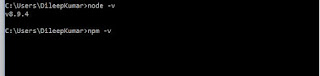
Hi, Here I would like to explain how to install Typescript in windows machine. Before installing Typescript, node.js/npm should be installed in your machine. Follow below steps: 1) Download node.js from this url: https://nodejs.org/en/download/ Note: This download file includes npm also in it. I have downloaded .msi file and the installation is normal process like we install any other application in our windows machine. 2) Once the installation is completed, we can run below commands to check whether node.js and npm is installed properly or not. 3) Go to command prompt and type below commands. 4) Once npm is installed run below command to install typescript. 5) Once Typescript is installed you will see below message. 6) Once Typescript is installed. Run sample typescript file to test whether it is installed properly or not. 7) Create sample file with extention .ts (Helloworld.ts) 8) write simple console.log("Typescript Installed"); 9) Go ...

Trim Leading and Trailing spaces from InputText on tab out.

Image
Hi, Here I would like to explain one use case to remove Leading and Trailing spaces from input text. Use case: On tab out of input text box, leading and trailing spaces should be removed. To implement this use case I have written custom converter which will do this work. But I need to refresh my component inside the converter code in order to reflect the changes on tab out. There are many use ways to implement this. Below is my way. Create Custom Converter class by implementing javax.faces.convert.Converter import javax.faces.component.UIComponent; import javax.faces.context.FacesContext; import javax.faces.convert.Converter; import org.apache.myfaces.trinidad.context.RequestContext; public class TrimEndSpacesConverter implements Converter{     public TrimEndSpacesConverter() {         super();     }          public Object getAsObject(FacesContext facesContext, UIComponent uiComponent, String string)...

java.lang.ClassNotFoundException: oracle.jdbc.OracleDriver - Jdeveloper

If anyone experiencing below issue with Jdeveloper. First go and check whether Oracle JDBC jar is added to your class path or not. java.lang.ClassNotFoundException: oracle.jdbc.OracleDriver  at java.net.URLClassLoader$1.run(URLClassLoader.java:202)  at java.security.AccessController.doPrivileged(Native Method)  at java.net.URLClassLoader.findClass(URLClassLoader.java:190)  at java.lang.ClassLoader.loadClass(ClassLoader.java:305)  at sun.misc.Launcher$AppClassLoader.loadClass(Launcher.java:301)  at java.lang.ClassLoader.loadClass(ClassLoader.java:246)  at java.lang.Class.forName0(Native Method)  at java.lang.Class.forName(Class.java:169)  at webserviceproducer.WebServiceProducer.getConnection(WebServiceProducer.java:34)  at webserviceproducer.WebServiceProducer.main(WebServiceProducer.java:29) I have added 'Oracle JDBC' jar to the project class path and issue got resolved. Thanks for visiting this blog.

Remove duplicates from array without using java utils.

public class RemoveDuplicates { public static void main(String[] args) { Integer arr[] = {1,4,2,1,7,5,0,7,7,1,1,5,4,9,4,1,5,4,9,7,6,1,7,7,8,9,9,0,4}; for(int i=0;i<arr.length-1;i++){ for(int j=i+1;j<arr.length-1;j++){ if(arr[i] == arr[j]){ for(int k = j; k<arr.length-1;k++){ arr[k] = arr[k+1]; }                                         //copy array to remove last element. Integer copy[] = new Integer[arr.length-1]; System.arraycopy(arr, 0, copy, 0, arr.length-1); arr = copy;                                        //decrease j value in case match found to not miss repeated values. j--; } } } for(int z=0; z<arr.length;z++) System.out.print(arr[z]); } }

Test Web Service using SOAP UI

Image
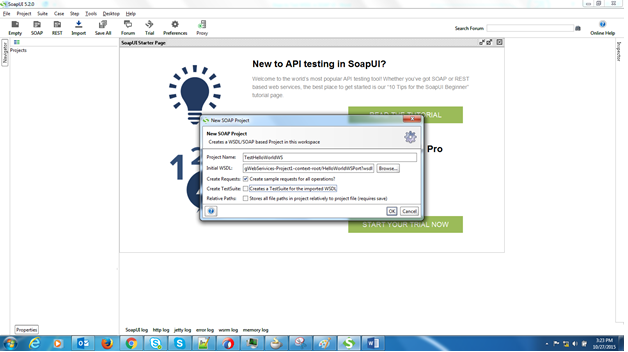
In this example I would like explain how to use SOAP UI to test web services. To demo this I have used the Web Service that I have created in my previous blog http://dileepkumarrongali.blogspot.com/2015/10/creating-web-service-using-jdeveloper.html File -->  New SOAP Project. Give project name and WSDL. And click OK.  SOAP project will be created. Now click on Request 1 file. Fill the required parameters in the left hand pane and click Alt + Enter or green play button. Response we get on the right hand side.  Thank you :)

Creating Web Service using JDeveloper.

Image
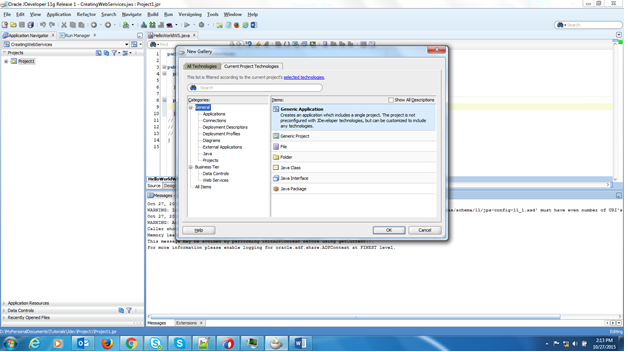
In the below example I would like to explain how to expose simple java class as web service. Steps to Create WebService Using Jdeveloper (version used 11.1.1.7.0) File -->  New -->  Generic Application  Provide Application Name and click Next Give Project Name and select project technologies Java and Web Services. And click Finish.  Create Java class in the project. Below is Sample Java code I have written.   Right click on java class and select ‘Create Web Service’ Select JAX-WS Annotations platform Leave Default Web Service Name and Port Name. And rest we can take default and click finish. We can see @WebService annotation added to our class.  And web.xml entry will be created and adds our web service class as servlet entry there.  To test this webservice, right click on webservice class and select Test Web service. In Http Analyzer, we can test our web ser...

Generate PDF Reports using iText

Image
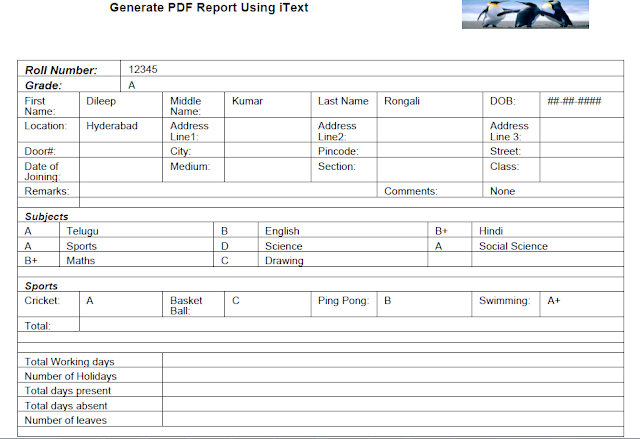
Hi, In this blog I would like to show how to create PDF report using iText API. Below is working code to generate PDF. import com.itextpdf.text.BadElementException; import com.itextpdf.text.BaseColor; import com.itextpdf.text.Document; import com.itextpdf.text.DocumentException; import com.itextpdf.text.Element; import com.itextpdf.text.Font; import com.itextpdf.text.Font.FontFamily; import com.itextpdf.text.Image; import com.itextpdf.text.PageSize; import com.itextpdf.text.Paragraph; import com.itextpdf.text.Phrase; import com.itextpdf.text.Rectangle; import com.itextpdf.text.pdf.PdfPCell; import com.itextpdf.text.pdf.PdfPTable; import com.itextpdf.text.pdf.PdfPageEventHelper; import com.itextpdf.text.pdf.PdfWriter; import java.io.FileOutputStream; import java.io.IOException; import java.net.MalformedURLException; public class PDFReportGeneration {     public PDFReportGeneration() {         super();     }   ...