Posts

Generate PDF Reports using iText
Image
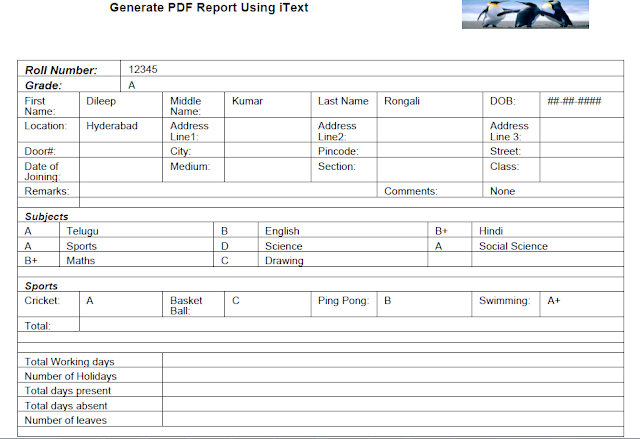
Hi, In this blog I would like to show how to create PDF report using iText API. Below is working code to generate PDF. import com.itextpdf.text.BadElementException; import com.itextpdf.text.BaseColor; import com.itextpdf.text.Document; import com.itextpdf.text.DocumentException; import com.itextpdf.text.Element; import com.itextpdf.text.Font; import com.itextpdf.text.Font.FontFamily; import com.itextpdf.text.Image; import com.itextpdf.text.PageSize; import com.itextpdf.text.Paragraph; import com.itextpdf.text.Phrase; import com.itextpdf.text.Rectangle; import com.itextpdf.text.pdf.PdfPCell; import com.itextpdf.text.pdf.PdfPTable; import com.itextpdf.text.pdf.PdfPageEventHelper; import com.itextpdf.text.pdf.PdfWriter; import java.io.FileOutputStream; import java.io.IOException; import java.net.MalformedURLException; public class PDFReportGeneration {     public PDFReportGeneration() {         super();     }   ...

javax.xml.ws.WebServiceException: javax.xml.ws.WebServiceException: java.lang.InstantiationException: weblogic.wsee.jaxws.client.async.AsyncTransportProvider

javax.xml.ws.WebServiceException: javax.xml.ws.WebServiceException: java.lang.InstantiationException: weblogic.wsee.jaxws.client.async.AsyncTransportProvider I got below error while deploying my webCenter project to the integrated weblogic server. Reason: Due to unwanted jars in the project Library and classpath. Solution: Remove unwanted jar from the libraries and classpath. In my case weblogic.jar is present. javax.xml.ws.WebServiceException: javax.xml.ws.WebServiceException: java.lang.InstantiationException: weblogic.wsee.jaxws.client.async.AsyncTransportProvider        at weblogic.wsee.jaxws.WLSInstanceResolver.getSingleton(WLSInstanceResolver.java:36)        at weblogic.wsee.jaxws.WLSInstanceResolver.start(WLSInstanceResolver.java:55)        at weblogic.wsee.jaxws.WLSInstanceResolver$WLSInvoker.start(WLSInstanceResolver.java:82)      ...

Failed to load weblogic client internal deployment descriptor. java.io.IOException.

Failed to load weblogic client internal deployment descriptor. java.io.IOException. If you are getting above error while making web service call in your java code. The cause might be with missing classes in your project path. In my case, I am trying to make web service call through java class and I got the above issue. To fix the issue, I have added wseeclient.jar to the project class path. I am using IDE JDeveloper to run my main java class. And this jar will be present in below path in my case. C:\Oracle\Middleware\wlserver_10.3\server\lib 

Send email from java code.

This blog will explain how to send email from java code. In order to send email from java code, we need to set properties of mail server and protocol. In my example I have set the authentication to false. So no authentication required before sending the email. Below is the working java code to send email. import java.util.Properties; import javax.mail.Message; import javax.mail.MessagingException; import javax.mail.Session; import javax.mail.Transport; import javax.mail.internet.InternetAddress; import javax.mail.internet.MimeMessage; public class SendEmail {     public SendEmail() {         super();     }     public static void main(String[] args) {         SendEmail sendEmail = new SendEmail();         //here you can set array size more to send mail to more users.       ...

BEA-000362 Server failed. Reason: [Management:141268]Parsing Failure in config.xml

<Sep 6, 2015 4:21:30 PM IST> <Info> <Management> <BEA-141107> <Version: WebLogic Server 10.3.5.0  Fri Apr 1 20:20:06 PDT 2011 1398638 > <Sep 6, 2015 4:21:30 PM IST> <Critical> <WebLogicServer> <BEA-000362> <Server failed. Reason: [Management:141268]Parsing Failure in config.xml on line 1, column 1: Content is not allowed in prolog.> <Sep 6, 2015 4:21:30 PM IST> <Notice> <WebLogicServer> <BEA-000365> <Server state changed to FAILED> <Sep 6, 2015 4:21:30 PM IST> <Error> <WebLogicServer> <BEA-000383> <A critical service failed. The server will shut itself down> <Sep 6, 2015 4:21:30 PM IST> <Notice> <WebLogicServer> <BEA-000365> <Server state changed to FORCE_SHUTTING_DOWN> Process exited. If you are getting above error means, Jdeveloper is not closed properly. And config.xml is corrupted. Deleting DefaultDomain fold...

Creating test users and roles in the weblogic server

Image
Many might have faced this situation while fixing bugs in ADF application. There will be one main application and it uses task flows or classes from different shared libraries. For example there is an issue in one shared library, to fix that we just run that particular project/application and try to fix the issue in that shared library project. But if the application is ADF security enabled then it is little difficult to perform exact test cases what we do when it is integrated with main application after fix. Because all the security settings are in main application jazn-data.xml file. We can disable security for a while and test the application. But it is not a good idea. Because by disabling security we are not doing full testing at all. So how to overcome this situation?   There is a sample way. We can create some dummy test users and test roles in development weblogic server. These test roles names should be same as the one we defined in jazn-data.xml in...